Posts

Er worden posts getoond met het label Android

Android and SonarQube with code coverage

Afbeelding
With this post we are going to walkthrough how to setup SonarQube with code coverage for a Android project. During this walkthrough we make use of the following system and software: Android Studio, version 4.1.1 Gradle, version 6.5 JDK / java, java 15.0.1 2020-10-20 JaCoCo, version 0.8.6 SonarQube, version 8.5.1 SonarQube scanner, version 2.7.1 Example Android project For this walkthrough there is an example project based on the template Navigation Drawer Activity where we added a data class Car.java with some unit tests in CarTest.java. This project is available on GitHub project with all code already inside! All important code changes can be found in below gradle files: Project build.gr...

AdMob and pre-launch reports

Afbeelding
AdMob and pre-launch reports Over the past years multiple posts are created to highlight issues with AdMob in combination with the pre-launch reports for the Google Play Console. In the beginning Google just clicked ads during the pre-launch run which were reported as illegal clicks, which could ban Google accounts delivering the adds [ 1 ]. Now a days Google is filtering those IP's to prevent false clicks, but is this really a solution? It feels more like a duct tape fix! Okey, so no more false clicks in Admob, but the pre-launch report also has some failures with AdMob ads. In the pre-launch report it can generate Stability issues like Non-SDK api: makeOptionalFitsSystemWindows()V or Non-SDK api: isTagEnabled(J)Z . Or Accessibility issues like Low contrast or Touch target size . To prevent that the pre-launch report is filled with noisy AdMob issues, we want to focus on...

Google Play: In-App review

Afbeelding
Google Play: In-App review App publishers are always searching for better ways to improve get user feedback and collect 5 star reviews. Every day the Android users rate millions of apps, but how can you get those Android users to rate you're app? App developers can create a button "Rate me", which links towards the Google Play store. This process is fine, but its navigates the user away from the app and into the Google Play store. To prevent this app switch Google has developed a new In-App Review API . This In-App Review flow creates an overlay within the app where the user can leave his review quick and fast. How to implement the In-App Review API? The In-App Review API is listed within Play Core library , add the package com.google.andr...

Android-x86 virtual machine configuration tips

Afbeelding
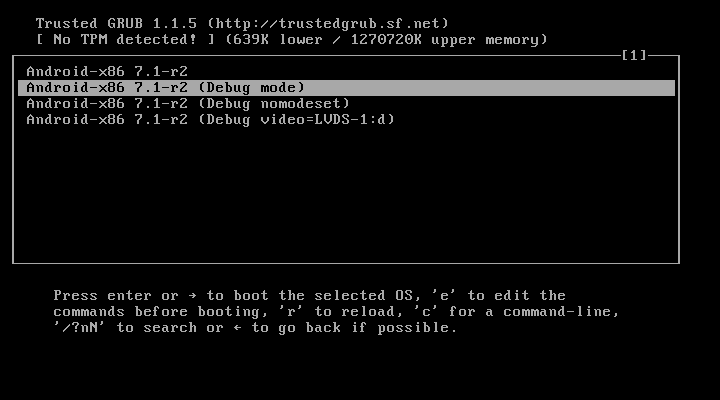
Android-x86 virtual machine configuration tips There are already several guides to install android x86 on virtual machines, but never about configuring them. This guide will show the most useful tips and tricks. If you read this without an Android x86 virtual machine follow below guides to install android x86 on a virtual machine: Install android with VM VirtualBox Install android with VMware Fusion This guide is writing with Androidx86 7.1-r2 as android version. Configure Android x86 to run with a GUI Android is based on Linux, which result that a default installation results in only terminal access. If you want a graphical user interface, and Yea we all want to use Android the same as a phone, we need to configure it to boot with a GUI. During installation GRUB is installed. Every time the Android x86 device boots, first GRUB is visible. ...

ListAdapter renewed

Afbeelding
ListAdapter renewed Every Android developer has worked with the RecyclerView when a list of content needs to be shown. Before the RecyclerView Android offered the widget ListAdapter , with bad performance and several other issues. Since the Android support lib version 27.1.0 Google added a new ListAdapter which extends RecyclerView.Adapter to make life even easier. Yes it has the name ListAdapter again :(, but for the rest it is completely different! The simplified ListAdapter To create a custom ListAdapter override the methods onCreateViewHolder() and onBindViewHolder(). All other methods are already handled by the ListAdapter and don't need any attention anymore. onCreateViewHolder() : Called when RecyclerView needs a new RecyclerView.ViewHolder of the given type to represent an item. onBindViewHolder() : Called by RecyclerView to display the data at the specified position. The ListAdapter constructor requ...

Road to App Bundle and Bundletool

Afbeelding
What is a App Bundle An Android App Bundle is a new upload format that includes all your app's compiled code and resources, but defers APK generation and signing to Google Play. ... So, users can download apps as large as 500MB and, with dynamic delivery, all of that storage is used for only the code and resources they need to run the app. source: https://developer.android.com/guide/app-bundle Google is actively trying decrease the sizes of apks, first with Multiple APK support . But this was not really a success as most developer should didn't use this feature. With App Bundle it's automatically executed on the background when the App Bundle is uploaded to the play store. This feature is called Dynamic Delivery .For each language, density and ABI (Application Binary Interface) an apk is generated with only the required content. This results in smaller apk's, which result in faster download times and less memory usage. ...

Refactor to Android X

Afbeelding
At the Google I/O 2018 AndroidX is announced. To prevent any miscommunication about what parts are from Android os and which parts are from extra supporting libraries. As app developer I'm always looking to improve how to build app and use the best tool / libraries to get maximal results. Migrate Android projects, using support libraries, to AndroidX to be ready for further updates. AndroidX packages With the implementation of AndroidX all API package naming is updated. Below we see an example of pre AndroidX packages com.android.support:appcompat-v7 and com.android.support.test.espresso . implementation 'com.android.support:appcompat-v7:27.1.1' implementation 'com.android.support.constraint:constraint-layout:1.1.0' implementation 'com.android.support:design:27.1.1' testImplementation 'junit:junit:4.12' androidTestImplementation 'com.android.support.test:runner:1.0.2' androidTestImplementation 'com.android...